NOSAtmosphereEffect
Atmo Engine
Atmo Engine is an open-source Android live wallpaper studio inspired by the distinctive Atmosphere transition in Nothing OS. It offers optional lock-screen-to-home-screen transitions or continuously applied effects, accurate previews, flexible image fitting, and wallpaper playlists without uploading your images.
📥 Download
Atmo Engine is available to download from the Play Store, F-Droid and Orion Store.


⚠️ Device Support & Disclaimer
Current Testing Status: This application has currently been tested exclusively on the Samsung Galaxy S25 Ultra and Nothing Phone 1.
While it may work on other Android devices running Android 13+ (API 33+), behavior on different manufacturers’ skins (FuntouchOS, OxygenOS, etc.) is not guaranteed.
Usage Guide
Follow these steps to set up the effect properly on your device.
⚡ Quick Setup: Share an Image
The fastest way to apply a wallpaper. Instead of opening the app and browsing for a file, you can send an image straight to Atmo Engine from anywhere:
- Find an image in your Gallery, or in any wallpaper app.
- Tap Share and choose Atmo Engine (“Set with Atmo Engine”) from the share sheet.
- Pick the effect you want — the app takes you straight to the crop screen and applies it. You can share a single image for a normal wallpaper, or select multiple images before sharing to build a rotating playlist. This skips the extra steps of saving the image, opening the app, and digging through your files to find it again. The regular in-app flow below still works exactly the same.
1. Select Your Effect
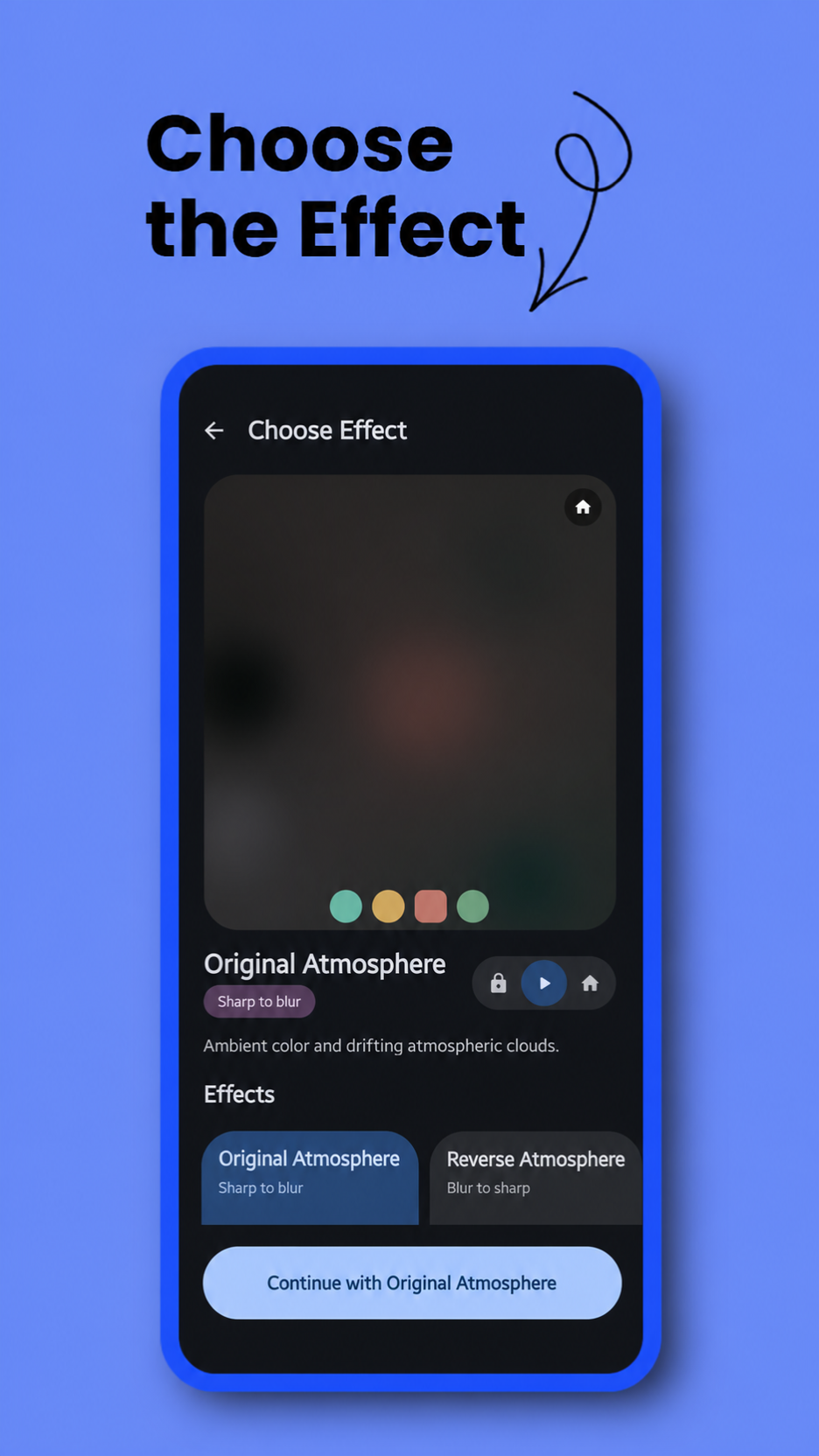
Open the app and choose your desired atmosphere style from the selection screen:
- Original Atmosphere: Signature style. A sharp wallpaper flows into drifting ambient clouds and blur.
- Reverse Atmosphere: Mysterious reveal. Deep ambient clouds clear to reveal the wallpaper.
- Glass Effect: Strong, continuous reeded-glass refraction can appear one rib at a time from right to left or fade in.
- Glass Effect (Reverse): The reeded glass can clear from left to right or fade out.
- Color Fill: Liquid awakening. Colors flow outward from your fingerprint.
- Color Fill (Reverse): Fluid drain. Colors wash away into grayscale.
- Canvas Sketch: A soft monochrome sketch transitions into the full wallpaper when unlocked.
- Canvas Sketch (Reverse): The full wallpaper transitions back into its monochrome sketch.
- Simple Frosted: Modern minimalism. Applies a clean, uniform frosted glass blur (no clouds).
- Simple Frosted (Reverse): Elegant clarity. Wakes up from a heavy frosted blur into a crystal clear wallpaper.
- Halftone Print: Retro aesthetic. Sharp view dissolves into comic-book CMYK dots when locked.
- Halftone Print (Reverse): Retro aesthetic. CMYK dots seamlessly expand into continuous color when unlocked.
Atmosphere with Glass
For Original or Reverse Atmosphere, enable Add glass effect while setting the image or from Fine tuning → Effect. The Fine Tune screen also exposes the rib count, rib thickness, and Background only subject isolation while Glass is enabled. With transitions enabled, the animation remains an Atmosphere transition: Original Atmosphere moves from the glass-treated image into its ambient state, while Reverse Atmosphere finishes on the glass-treated image. With transitions disabled, Atmo holds the fully atmospheric effect state on the selected screen or screens, while any screen assigned the original remains genuinely unchanged.
Subject Isolation for Canvas, Glass, and Halftone
Canvas Sketch, Glass Effect, Atmosphere with Glass, and Halftone Print share the same on-device subject model. Canvas Sketch can use Subject segmentation to anchor its sketch to a prominent person, character, animal, or object. Glass and Halftone provide Background only, which keeps the detected foreground subject clear while applying the selected effect behind it. Model delivery depends on the app distribution:
- Google Play build: Uses the higher-quality ML Kit subject model supplied by Google Play services. The model is not downloaded automatically by Atmo Engine. Fine Tuning shows its real installed status and provides an explicit Download subject model button. After installation, segmentation runs on-device and works offline.
- F-Droid build: Includes the open-source U2NetP model and a source-built FOSS LiteRT runtime in the APK. It is ready immediately, requires no download, and does not depend on ML Kit or Google Play services.
- Open Fine Tuning for Canvas Sketch, Glass Effect, or Halftone Print.
- In the Google Play build, download the optional model if it is not already installed.
- Turn on Subject segmentation for Canvas Sketch or Background only for Glass or Halftone.
- Preview or apply the wallpaper normally.
If Canvas Sketch cannot find a confident foreground subject, it falls back to sketching the complete wallpaper. A background-only effect waits for a usable mask instead of applying across an unprotected subject. Wallpaper image contents and generated masks never leave the device. Atmo Engine does not request the INTERNET or ACCESS_NETWORK_STATE permission. In the Google Play build, Google Play services may use its own network access only when the user requests the optional model download.
2. Select Image & Playlist Mode
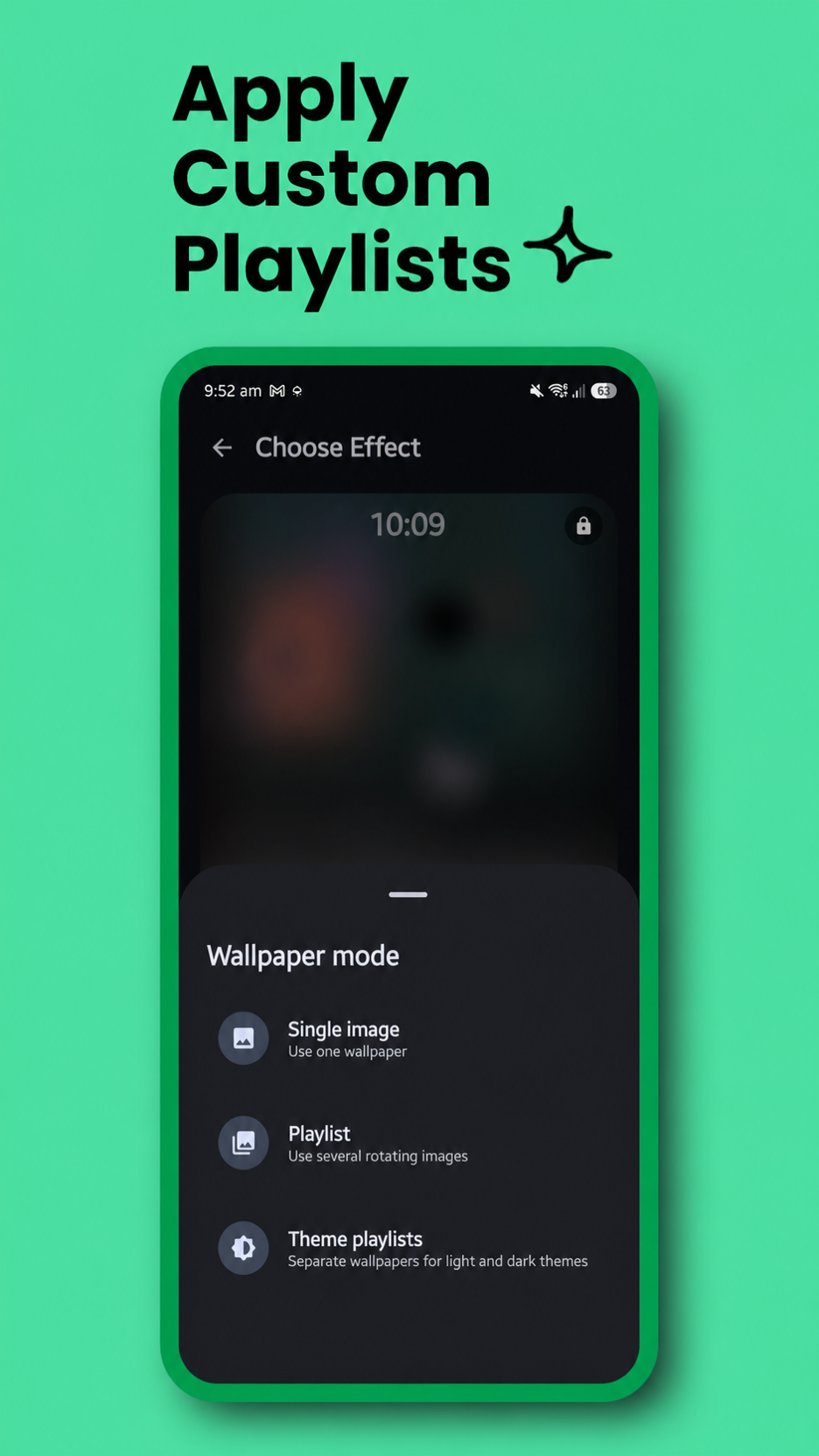
After selecting an effect, you will be prompted to choose your wallpaper mode:
-
Single Image: Standard mode. Pick one image, crop it, and apply.
-
Multiple Images (Playlist): Select multiple images from your gallery to create a wallpaper playlist. Apply it directly or adjust and crop each image first. Once finished, Atmo rotates through the collection using your selected interval.
-
Theme Playlists: Build separate Light and Dark playlists with one or more wallpapers in each. Atmo switches to the matching collection when the system theme changes, then rotates within that collection using your selected interval.
-
Edit Existing Playlist: If you already have a standard or theme-based playlist running, this option loads your saved wallpapers (including your exact zoom and crop settings). You can remove images, add new ones, or tweak existing crops without starting over.
3. Application & Activation
Please follow these simple steps to apply the wallpaper:
- Apply the Wallpaper: Once you are happy with your crop or playlist selection, tap the “Apply” button.
- Review Instructions: A dialog box will explain the live-wallpaper setup. Tap “Set Wallpaper” to proceed.
- Set Wallpaper: The app will redirect you to the Android System’s Live Wallpaper preview screen. Tap “Set Wallpaper” (or the checkmark/apply icon, depending on your device).
- Choose Both Screens: Select “Home screen and Lock screen”. Atmo must remain the live wallpaper on both screens so it can show either the effect or the original image on each one.
- Finish: Setup is complete. Lock and unlock the screen to test an enabled transition, or use Fine tuning to keep the effect fully applied on the selected screen or screens.
Transitions or a Continuously Applied Effect
Open Fine tuning → Timing and use Animate transitions to choose how the wallpaper behaves:
- On: Atmo performs the selected lock-screen-to-home-screen transition.
- Off: Atmo keeps the effect fully applied on the selected screen or screens and renders the original image on any other screen, with no unlock transition. This is still a live wallpaper; Atmo does not export or install a baked static image.
When transitions are off, Keep effect applied on controls what the same live-wallpaper service renders:
- Home screen: The selected effect stays on Home while Atmo renders the original image on Lock.
- Lock screen: The selected effect stays on Lock while Atmo renders the original image on Home.
- Both: The selected effect stays visible on both Home and Lock.
These choices do not install a static wallpaper and do not move Atmo to only one destination. Atmo remains the live wallpaper on both screens; only the rendered state changes.
Disabling transitions does not disable other live-wallpaper features. Playlists and theme playlists continue rotating, Fine Tune controls remain available, Background only subject isolation continues working, and wallpaper scrolling remains active where the launcher supports it.
Interface and Previews
Atmo Engine uses Jetpack Compose and Material 3 throughout the setup flow. Material Expressive styling follows the device’s system color palette when enabled, while the appearance panel also supports fixed colors, System/Light/Dark modes, and an optional pitch-black dark background.
Effect cards, the active-wallpaper dashboard, crop screens, and playlist cards use live previews driven by the real effect implementations. This lets you inspect the selected wallpaper and effect behavior before applying it through Android’s live wallpaper screen.
Advanced Customization
Take full control of the animation and look. You can now tweak the following settings dynamically:
Visual Adjustments
- Dimness Level: Adjust the darkening overlay to ensure your home screen icons remain readable against bright wallpapers.
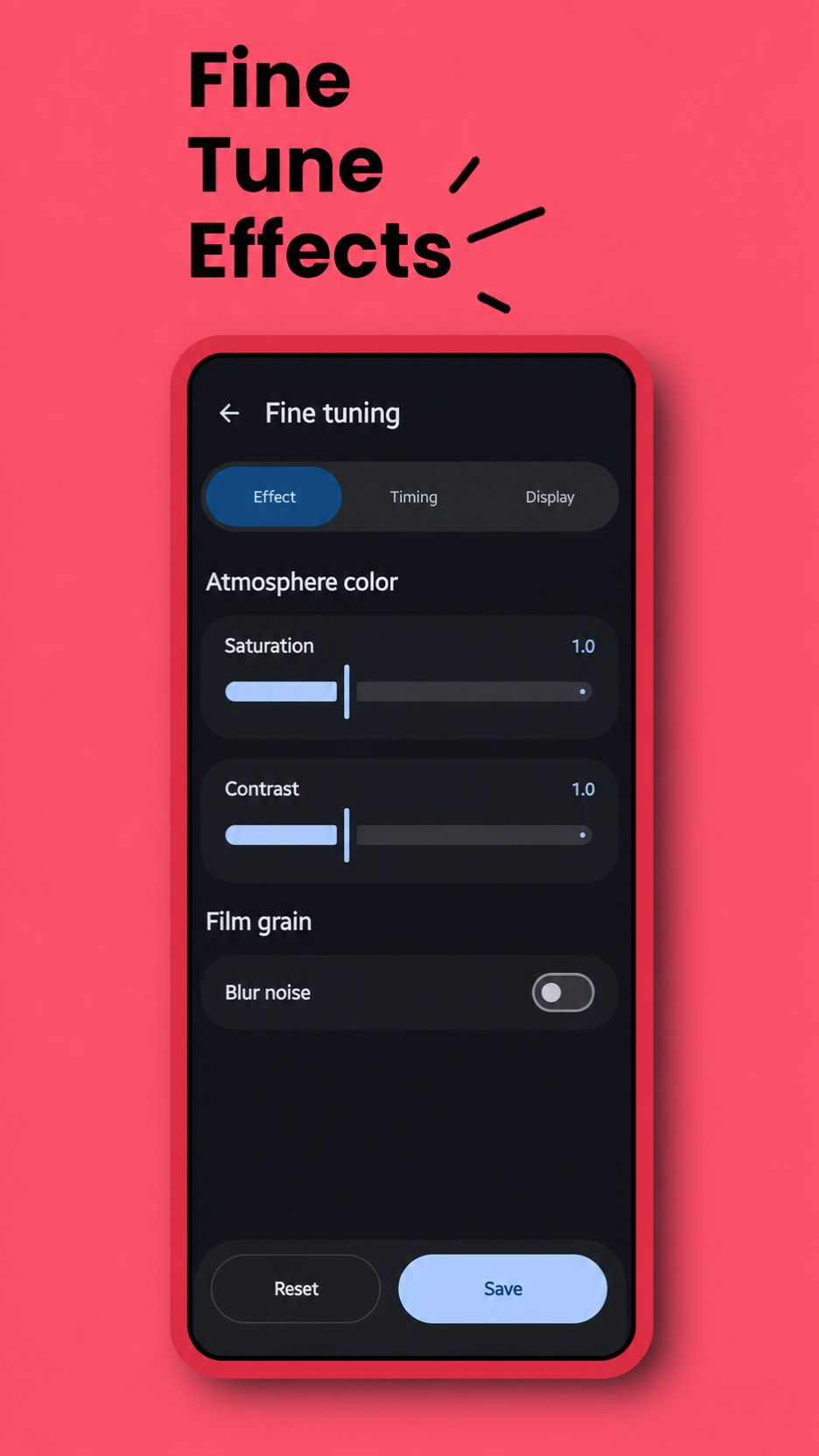
- Blob Saturation: (Original Atmosphere & Reverse Atmosphere Effects Only) Adjusts the color intensity of the drifting atmospheric clouds. Increase to make the colors vibrant and punchy, or decrease to zero for a muted, grayscale cloud effect.
- Blob Contrast: (Original Atmosphere & Reverse Atmosphere Effects Only) Adjusts the harshness of the atmospheric clouds. Higher values create distinct, separated color pools, while lower values blend the colors softly and smoothly together.
- Add Glass Effect: (Original Atmosphere & Reverse Atmosphere Only) Available while setting or editing an image and in Fine Tune. Uses a customizable reeded-glass image for the clear side of the Atmosphere transition. The always-applied mode keeps the fully atmospheric effect state on the selected screen or screens, while any screen assigned the original remains genuinely unchanged.
- Glass Lines: (Glass Effects Only) Adjusts the number of refractive ribs and the shape of each rib.
- Glass Transition Style: (Glass Effects Only) Choose right-to-left or fade-in for Glass Effect, and left-to-right or fade-out for Glass Effect Reverse.
- Blur Strength: (Frosted Effects Only) Use the slider to fine-tune the intensity of the blur radius, from a light mist to heavy glass.
- Noise Grain: Enable a film-grain texture on top of the blur. You can customize:
- Noise Strength: How visible the grain is.
- Noise Scale: The size/coarseness of the grain particles.
- Halftone Pixel Size: (Halftone Effects Only) Dynamically adjust the size of the printed dots. Setting this to
0renders the original continuous tones instead of dots. - Black & White Effect: (Halftone Effects Only) Converts the CMYK color halftone pattern into a single-channel grayscale newspaper print.
- Fingerprint Location: (Color Fill Effects Only) Two sliders to adjust the horizontal and vertical position of effect start place sync with the fingerprint location.
- Sketch Detail: (Canvas Sketch Only) Controls how many wallpaper contours are retained.
- Line Thickness: (Canvas Sketch Only) Adjusts the width of the monochrome sketch lines.
- Subject Segmentation: (Canvas Sketch Only) Optionally anchors the sketch to a detected foreground subject.
- Background Only: (Glass and Halftone Effects Only) Keeps the detected subject clear while applying reeded glass or halftone printing to the background. Canvas, Glass, and Halftone share ML Kit in Google Play builds or bundled U2NetP in F-Droid builds.
Animation & Behavior
- Animate Transitions: Turn lock-to-home animation on, or keep the effect fully applied on the selected screen or screens and the original image on any other screen, with no unlock transition.
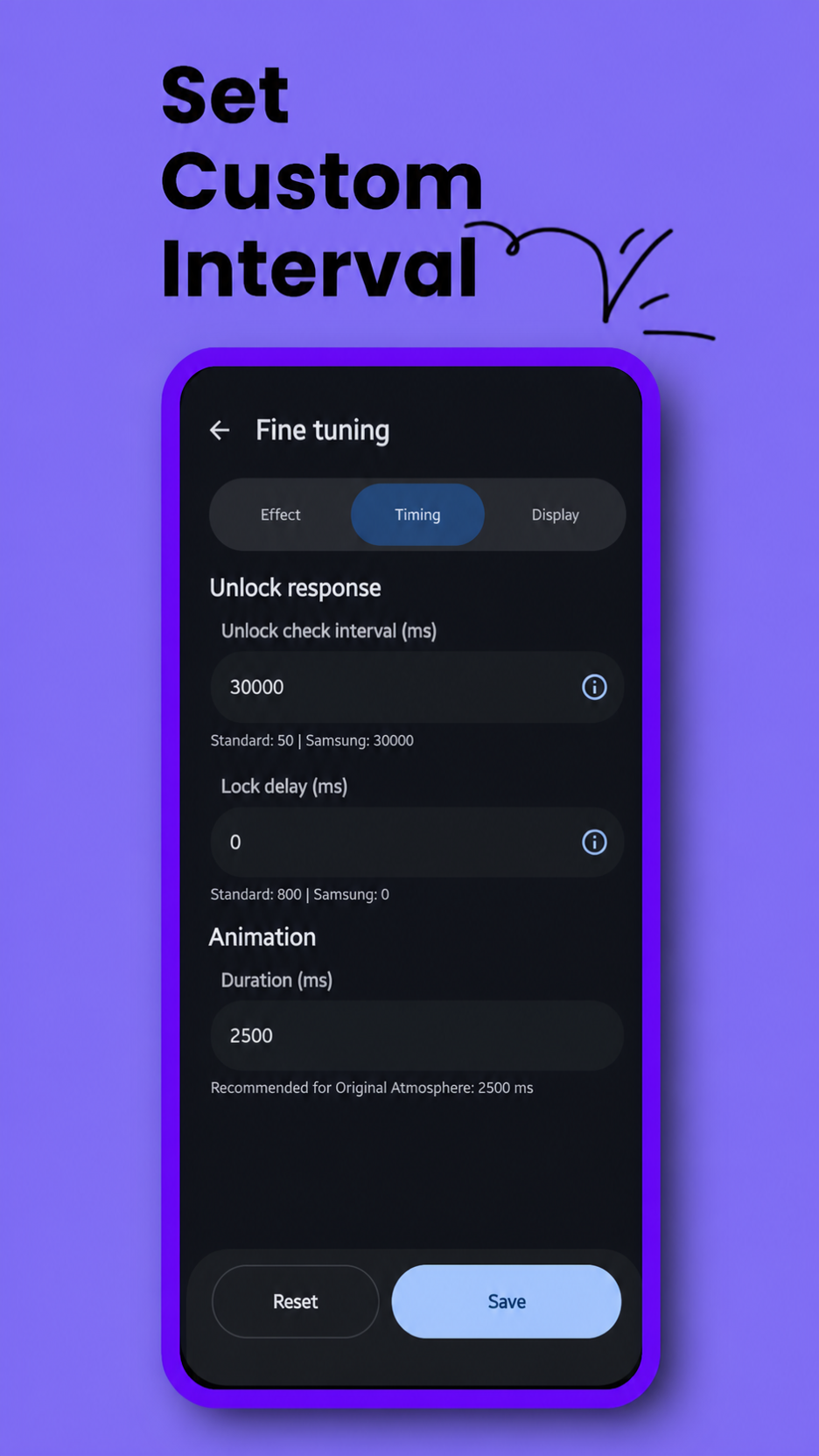
- Animation Duration: Control the total transition duration while transitions are enabled.
- Lock Delay (Anti-Flicker): While transitions are enabled, adds a configurable pause before the wallpaper resets when you lock the phone. This prevents the visual glitch where the wallpaper “snaps” back to its initial state before the screen turns fully black.
- Unlock Check Interval: While transitions are enabled, adjusts how frequently the app detects unlock events. Tuning this eliminates “delayed start” issues, ensuring the animation begins immediately when you wake your device.
- Sync System Colors: Publishes a locally extracted wallpaper palette to Android whenever a single wallpaper or playlist image changes. Whether the wider system theme refreshes is ultimately controlled by the device manufacturer.
Playlist & Rotation
(Available when using Playlist or Theme Playlists mode)
- Rotation Interval: Controls how often the wallpaper changes from your playlist.
- Options: Every Lock (Instant), 1 Minute, 15 Minutes, 1 Hour, up to 24 Hours.
- Theme Playlists: A system Light/Dark change immediately switches collections. The selected interval continues to control rotation inside whichever collection is active.
- Smart Rotation: To prevent lag or visual glitches, the wallpaper only rotates when the screen is OFF.
- Example: If you set “15 Minutes”, the app checks the time whenever you lock your phone. If 15 minutes have passed since the last change, it swaps the wallpaper in the background so it’s ready the next time you unlock.
Palette Diagnostics
When an Atmo wallpaper is active, tap the Atmo Engine title seven times to open the device-specific palette diagnostics screen. It compares Atmo’s locally extracted colors, Android’s Wallpaper API colors, and the current system color resources. The Force Apply test is available only while Sync System Colors is enabled. Diagnostic values and engine traces remain on the device.
Screenshots
Telegram Group
I’ve made a Telegram group for discussing issues and feature suggestions. You can join it using this link.
Known Issues
- Samsung Adaptive Clock: One UI may disable or limit its adaptive clock treatment while a live wallpaper is active.
Build & Installation
This project is built using Kotlin and Gradle.
Atmo Engine keeps one shared codebase and combines two flavor dimensions:
All artifacts in the table below use version name 7.0.4.
| Flavor | Minimum Android | Target SDK | Version code | Intended release |
|---|---|---|---|---|
v33Play |
Android 13 / API 33 | API 33 | 300704 |
ML Kit APK |
v33Fdroid |
Android 13 / API 33 | API 33 | 300704 |
FOSS APK for F-Droid |
v35Play |
Android 15 / API 35 | API 36 | 400704 |
Google Play ML Kit AAB |
v36Play |
Android 16 / API 36 | API 36 | 500704 |
ML Kit APK |
v36Fdroid |
Android 16 / API 36 | API 36 | 500704 |
FOSS APK |
The play source set contains only the ML Kit implementation and explicit model-download controller. The fdroid source set contains only U2NetP, its model files, and the source-built FOSS LiteRT runtime. UI, effects, playlists, palette behavior, and settings remain shared in main. Model and runtime provenance is recorded in THIRD_PARTY_NOTICES.md.
Stable and beta release workflows produce exactly five artifacts: Android 16+ ML Kit and FOSS APKs, Android 13+ ML Kit and FOSS APKs, and an Android 15+ ML Kit AAB for Google Play. CI inspects every archive before signing: ML Kit artifacts must not contain the U2NetP model or LiteRT native runtime, both FOSS APKs must contain them, and each ML Kit APK must remain smaller than its matching FOSS APK and below 10 MiB.
- Clone the repository.
- Open in the latest stable Android Studio.
- Sync Gradle.
- Select the required build variant, or run one of these tasks:
./gradlew assembleV33PlayRelease
./gradlew assembleV33FdroidRelease
./gradlew bundleV35PlayRelease
./gradlew assembleV36PlayRelease
./gradlew assembleV36FdroidRelease
Release signing keys are intentionally not stored in the repository. Configure your Play upload key locally before uploading either AAB; F-Droid builds and signs its own APK.
F-Droid should select both v33 and fdroid in its build metadata.
git clone https://github.com/saad-khan-rind/NOSAtmosphereEffect.git
Author
Saad Ullah Khan 📍 Passau, Germany 📧 khansaad45678900@gmail.com 🔗 LinkedIn 💻 GitHub 📄 Download Resume 🌐 Portfolio
License
This project is open-source and available under the MIT License. Bundled third-party components retain their respective open-source licenses; see THIRD_PARTY_NOTICES.md.
Privacy Policy
The privacy policy is this.
⭐️ Feel free to fork, star, and use this code!